How to Keep Baseball Stats with Tap Live Stats
A baseball box score answers the questions every player and parent asks after a game: who got on base, who drove in runs, who struck out and who made the plays in the field. Tap Live Stats lets you keep one on your phone, play by play, without a scorebook or any math. This guide covers recording each play, keeping the score, and reading the box score column by column.
Before the first pitch
Open Tap Live Stats, tap Track Player Stats, then Start New Game and choose Baseball. Enter the home and visiting team names, check the date and time, and tap OK. Your game appears in the list; tap it to start recording.
Baseball games can run long, so a charged phone and a seat with a clear view of the field help as much as the app does.
Recording a play
Every stat takes the same steps:
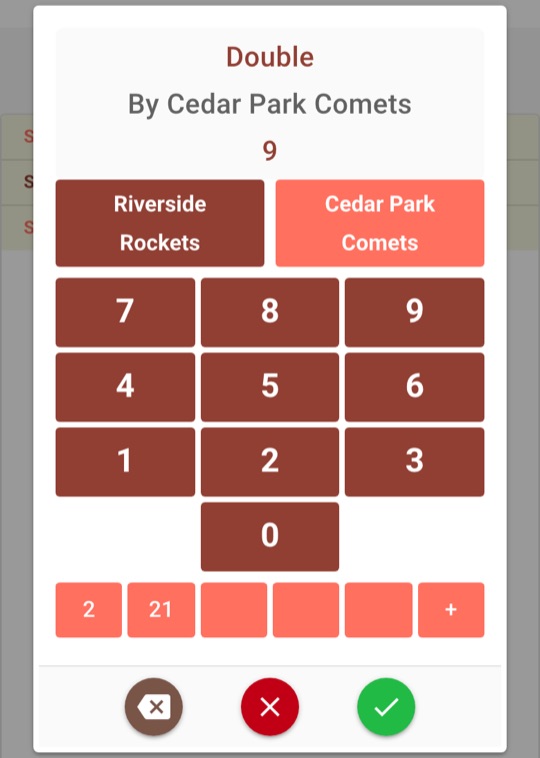
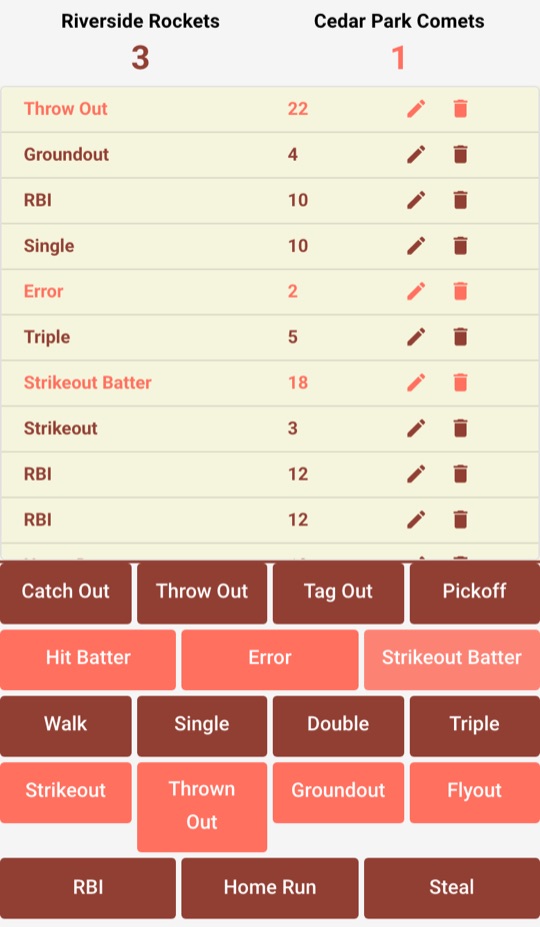
- Tap the button for what just happened, such as Double.
- On the number pad, check the team. The pad remembers the last team you picked, so when the other team comes up to bat or takes the field, tap its button.
- Tap the player's jersey number and tap the green check mark.
The red ✗ closes the pad without saving, and the backspace key fixes a mistyped digit. Below the keypad are five quick-select slots: the first time you enter a number it fills the next empty slot, and after that one tap enters it. Long-press a slot to put the current number there instead.
Recording common plays
Each button records one thing, so many plays take more than one entry:
- A single that drives in a run: Single for the batter, then RBI for the batter.
- A two-run home run: Home Run for the batter, then RBI twice.
- A strikeout: Strikeout for the batter. To credit the pitcher too, add Strikeout Batter for the pitcher.
- A ground ball to short, thrown to first: Groundout for the batter, then the putout for the fielder who made it with Throw Out.
- A batter safe on an error: Error for the fielder. There is no button for the batter in this case, so it does not count as an at-bat.
Keeping the score
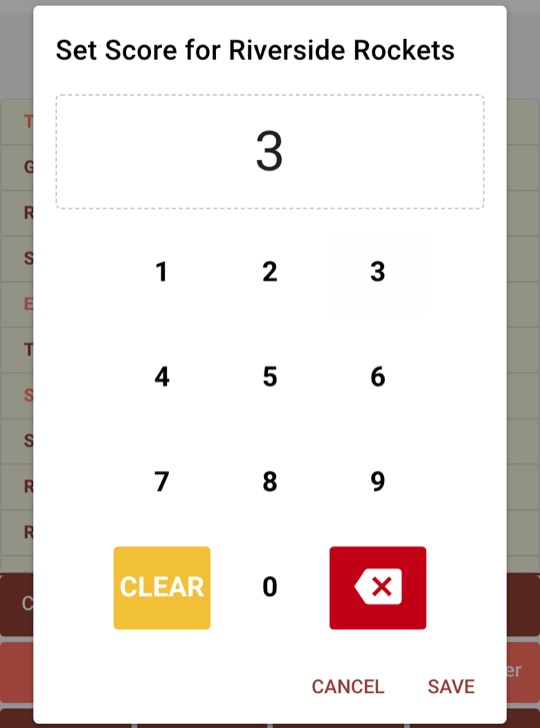
In baseball, runs are not added from the buttons; you enter them yourself. Tap a team's score at the top of the screen, tap Clear, type the team's total runs and tap Save.
Recording an RBI does not change the score on its own, so keep an eye on the scoreboard and update the score as runs come in.
Fixing mistakes
Every play you record appears in a list under the score, newest first, colored by team. Wrong player? Tap the pencil next to the entry and enter the right jersey number. Wrong button? Tap the trash can to remove the entry and record the play again. The box score updates to match.
Reading the box score
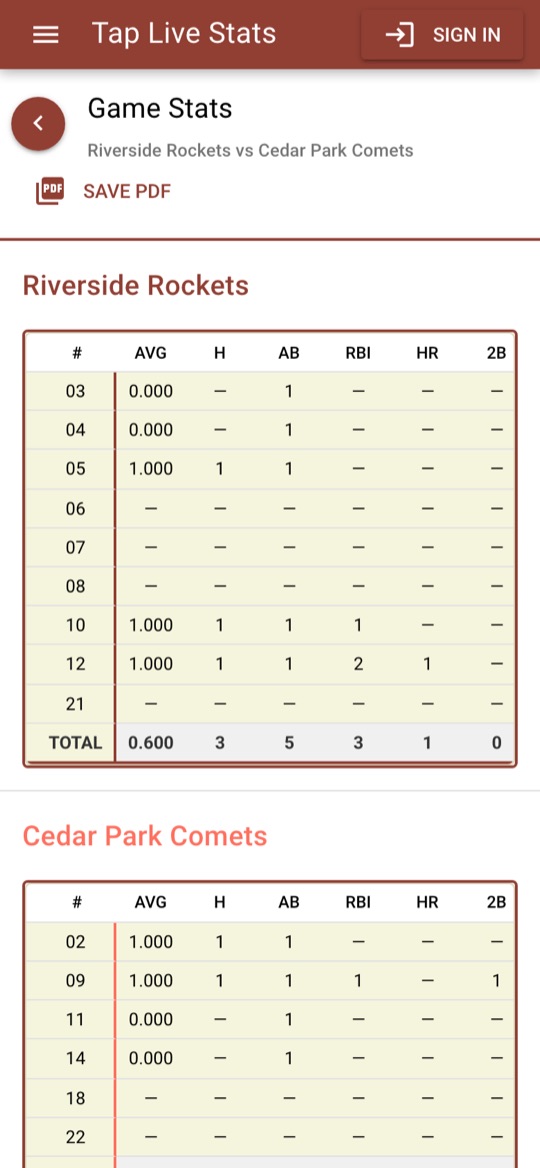
Open View Stats on the game for a box score of every player on both teams, sorted by jersey number, with a TOTAL row for each team. Here is what each column means and how it is calculated:
- AVG: batting average, hits divided by at-bats.
- H: hits. Singles, doubles, triples and home runs.
- AB: at-bats. Hits plus Strikeout, Groundout, Flyout and Thrown Out. Walks do not count as at-bats.
- RBI: runs batted in, one for each time you tapped RBI.
- HR, 2B, 3B: home runs, doubles and triples.
- BB: walks.
- K: the batter's strikeouts.
- SB: stolen bases.
- E: errors.
- PO: putouts, from Catch Out, Throw Out, Tag Out and Pickoff.
Averages are shown to three decimal places: 0.333 means one hit in three at-bats, and 1.000 means a hit every time. A dash means the player had none of that stat, or no at-bats for an average. Strikeout Batter and Hit Batter stay in the play list but are not added to any column, so a pitcher's strikeouts never count against their own batting line.
Tips for accurate stats
- Write the batting order down before the game. Knowing who is up next makes the jersey number one tap away.
- Update the runs at the end of every half inning, not just at the end of the game, so the score on the screen always matches the scoreboard.
- Check the team on the number pad every time the sides change. It is the most common way a play ends up on the wrong team.
- Missed a jersey number? Record the play with your best guess so it isn't lost, then fix the number with the pencil between innings.