How to Keep Basketball Stats with Tap Live Stats
A good box score tells a player more than the final score ever will: how many shots they took, how many they made, who crashed the boards and who kept the ball moving. Keeping one used to take a clipboard and a calculator. With Tap Live Stats you record each play with a few taps during the game, and the box score builds itself.
Before tip-off
Open Tap Live Stats, tap Track Player Stats, then Start New Game and choose Basketball. Enter the home and visiting team names, check the date and time, and tap OK. Your game appears in the list; tap it to start recording.
Have both rosters' jersey numbers handy. Every stat is recorded against a jersey number, so a quick look at the lineup before the game saves guessing later.
What you can record
The buttons are grouped by what they do:
- Made shots: 2 Pointer, 3 Pointer and Free Throw. These add 2, 3 or 1 point to the team's score automatically.
- Missed shots: Miss 2 Pointer, Miss 3 Pointer and Miss Free. They don't change the score, but they are what make shooting percentages possible.
- Rebounds: Off Rebound and Def Rebound.
- Playmaking and defense: Assist, Steal and Block.
- Turnovers and fouls: Turnover, Foul and Technical.
Recording a play
Every stat takes the same three steps:
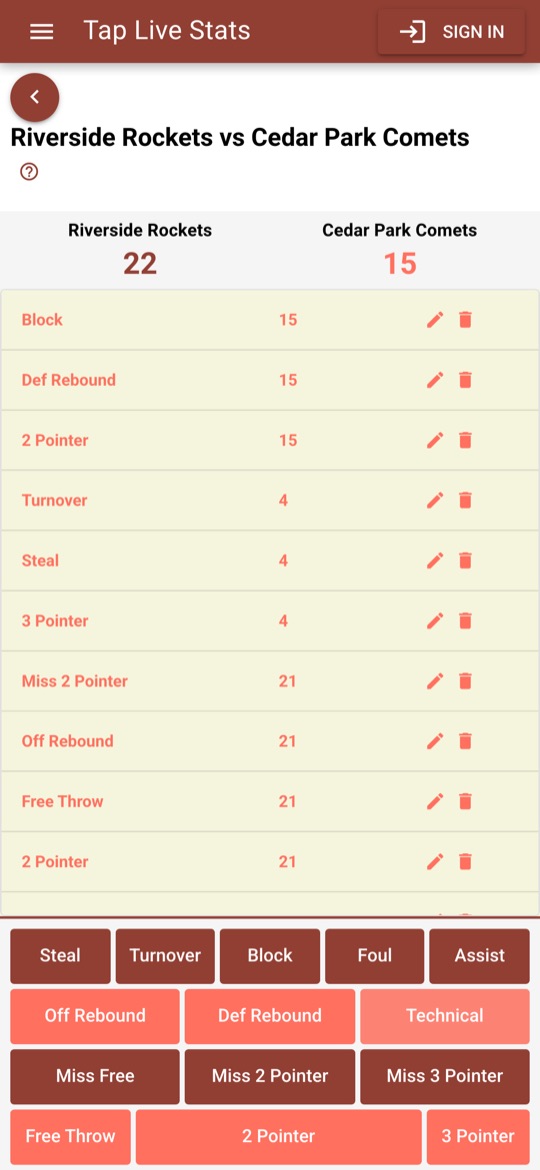
- Tap the button for what just happened, such as 2 Pointer.
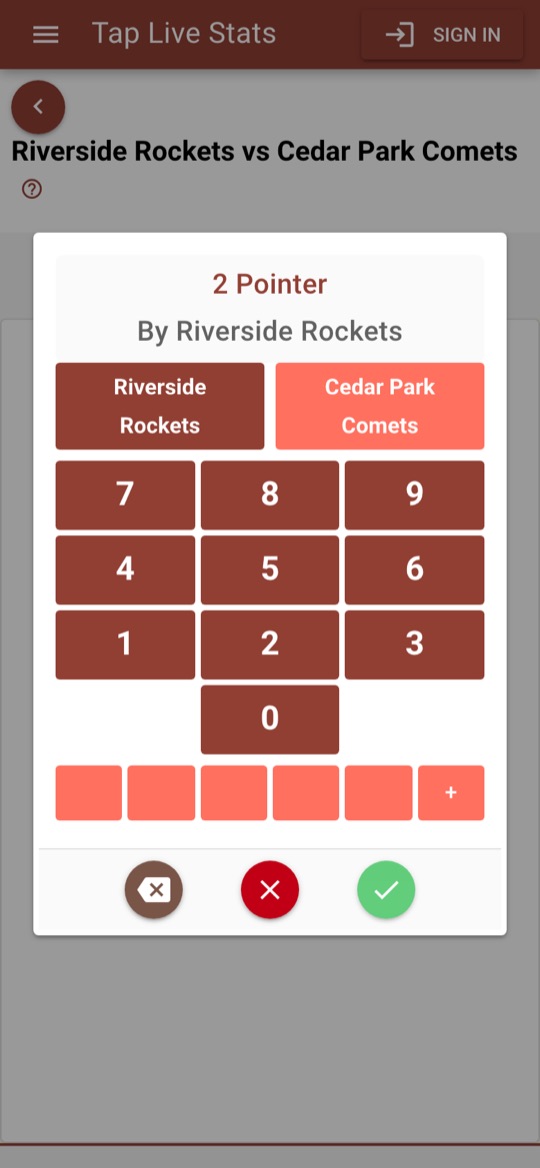
- On the number pad, check the team. The pad names the team at the top; tap the other team's button to switch.
- Tap the player's jersey number and tap the green check mark.
The red ✗ closes the pad without saving, and the backspace key fixes a mistyped digit.
Quick-select jerseys
Below the keypad are five quick-select slots for the players you record most. The first time you enter a number it fills the next empty slot; after that, one tap on the slot enters that number. Long-press a slot to put the current number there instead. Loading your starters into the slots early makes a fast game much easier to keep up with.
Recording common plays
Each button records one thing, so some plays take two entries. Recording them the way a scorer would keeps the box score honest:
- An assisted basket: record the 2 Pointer or 3 Pointer for the shooter, then an Assist for the passer.
- A miss and a rebound: record the miss for the shooter, then the Off Rebound or Def Rebound for whoever got the ball.
- An and-one: record the made basket, then the Free Throw or Miss Free when it is taken.
- Free throws: record each attempt separately, made or missed. Two shots means two entries.
Fixing mistakes
Every play you record appears in a list at the top of the screen, newest first. Wrong player? Tap the pencil next to the entry and enter the right jersey number. Wrong button? Tap the trash can to remove the entry and record the play again. The score and box score update to match.
If the score on the screen drifts from the scoreboard, for example because a basket happened while you looked away, tap the team's score and type the correct number. Check it against the scoreboard at each break and you will rarely need to.
Reading the box score
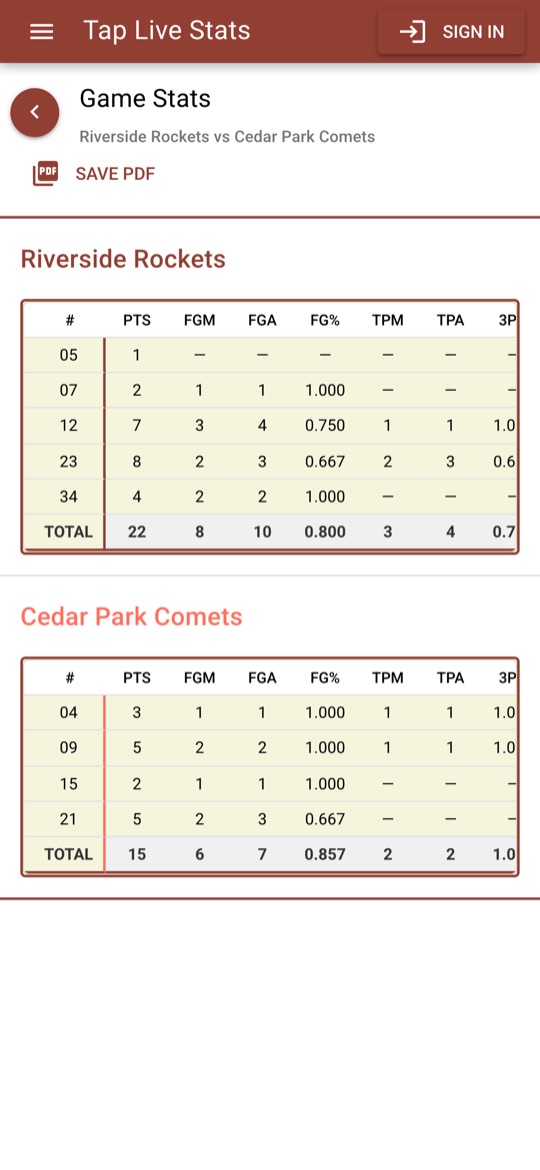
Open View Stats on the game for a box score of every player on both teams, sorted by jersey number, with a TOTAL row for each team. Here is what each column means and how it is calculated:
- PTS: points. 2 for each 2 Pointer, 3 for each 3 Pointer, 1 for each Free Throw.
- FGM, FGA, FG%: field goals made, attempted and the percentage made. Field goals include both 2- and 3-pointers; attempts are makes plus misses.
- TPM, TPA, 3P%: three-pointers made, attempted and the percentage made.
- FTM, FTA, FT%: free throws made, attempted and the percentage made.
- ORB, DRB: offensive and defensive rebounds.
- AST, STL, BLK, TO: assists, steals, blocks and turnovers.
- PF: personal fouls, counted from the Foul button. Technicals are kept in the play list but are not added to PF.
Percentages are shown as decimals: 0.750 means 75 percent, and 1.000 means every shot went in. A dash means the player had none of that stat, or no attempts for a percentage.
Tips for accurate stats
- Record plays as they happen. Saving them up for a timeout is how plays get missed.
- Don't skip the misses. Without them, every shooter looks perfect and the percentages mean nothing.
- Missed a jersey number? Record the play with your best guess so it isn't lost, then fix the number with the pencil at the next stoppage.
- Match the score to the scoreboard at every break, and fix any difference while the game is fresh in your mind.