How to Keep Bowling Scores with Tap Live Stats
Bowling scoring is simple to watch and fiddly to add up: strikes and spares borrow from the next balls, the tenth frame has bonus balls, and a match adds handicaps and team points on top. Tap Live Stats does all of it. Enter the pins on each ball and the app builds a real scorecard for every bowler, then works out series, averages, strike and spare percentages, team totals and match points. This guide covers setting up the match, scoring each ball and reading the results.
Setting up the match
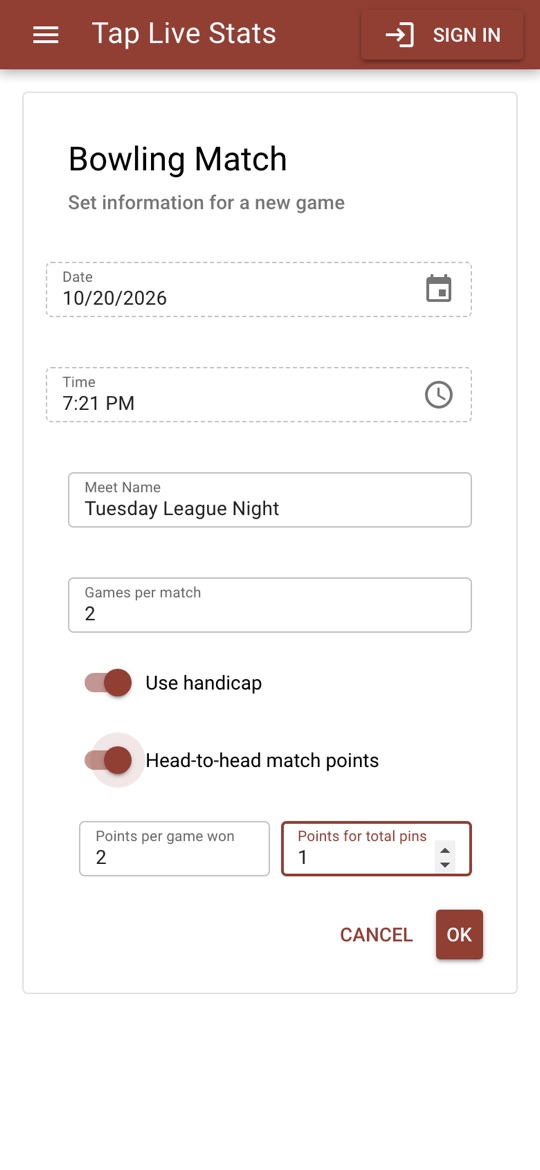
Open Tap Live Stats, tap Track Player Stats, then Start New Game and choose Bowling. Enter the match or league night name, then:
- Games per match: how many games each bowler rolls, 3 by default.
- Use handicap: turn it on to add each bowler's handicap to every game they finish.
- Head-to-head match points: for a match between exactly two teams, the points for winning each game and for the higher total pins over the match.
Adding bowlers
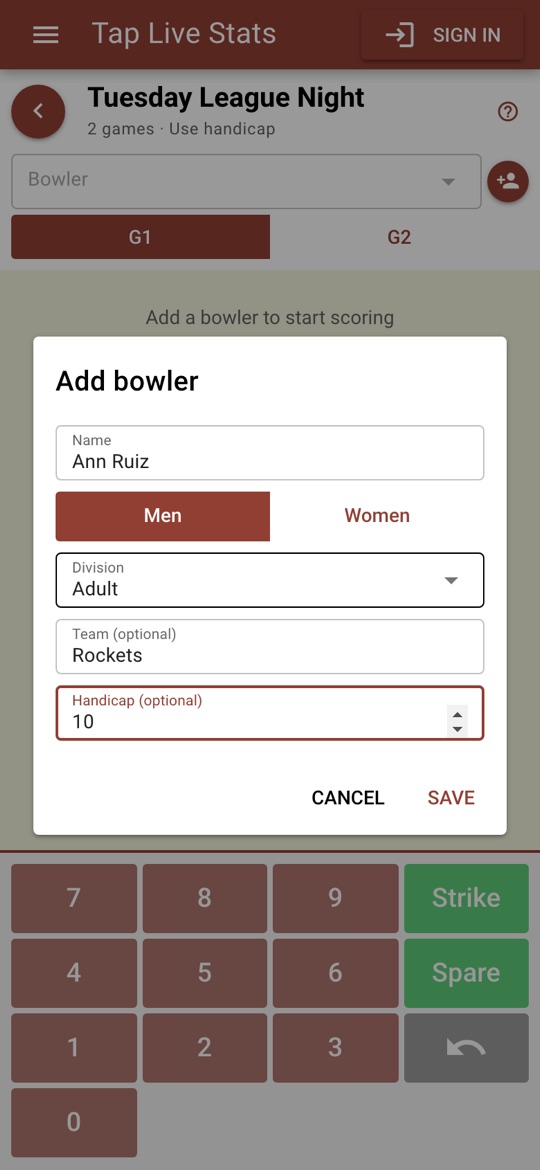
Tap the add-person button. Enter the bowler's name, choose Men or Women, and choose a division (Varsity, JV, Open, Youth or Adult) or type your own. Add a team name if they bowl for a team; leave it blank for an individual. Teams and individuals can bowl in the same match. With handicap on, enter the bowler's handicap too.
Scoring each ball
For each ball:
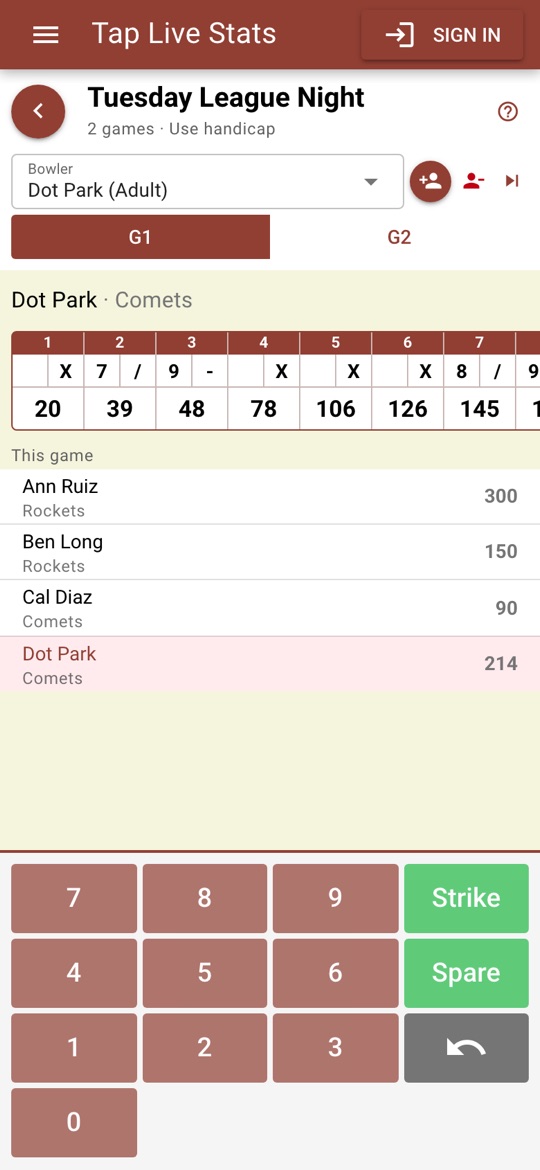
- Choose the bowler at the top, or tap the next-bowler button beside the name to move down the lineup, and check the game tab.
- Tap the number of pins knocked down: 0 to 9, Strike, or Spare to clear the pins left standing.
- Repeat for the next ball. The scorecard fills in each frame and its running total as soon as it can be scored.
Keys that are not possible are greyed out: after a 7 only 0 to 2 or Spare are left, and Strike is only possible on a full rack. A gutter ball followed by all ten pins is a spare, not a strike. The tenth frame gives the bonus balls a strike or spare earns, and once a game is complete every key turns off.
Under the scorecard, every bowler's score in this game is listed, with In progress until they finish.
Fixing mistakes
Tap the undo key to take back the last ball the selected bowler threw in this game. Undo again to go further back. If you are signed in, an undone ball is removed from your backed-up copy too.
Reading the results
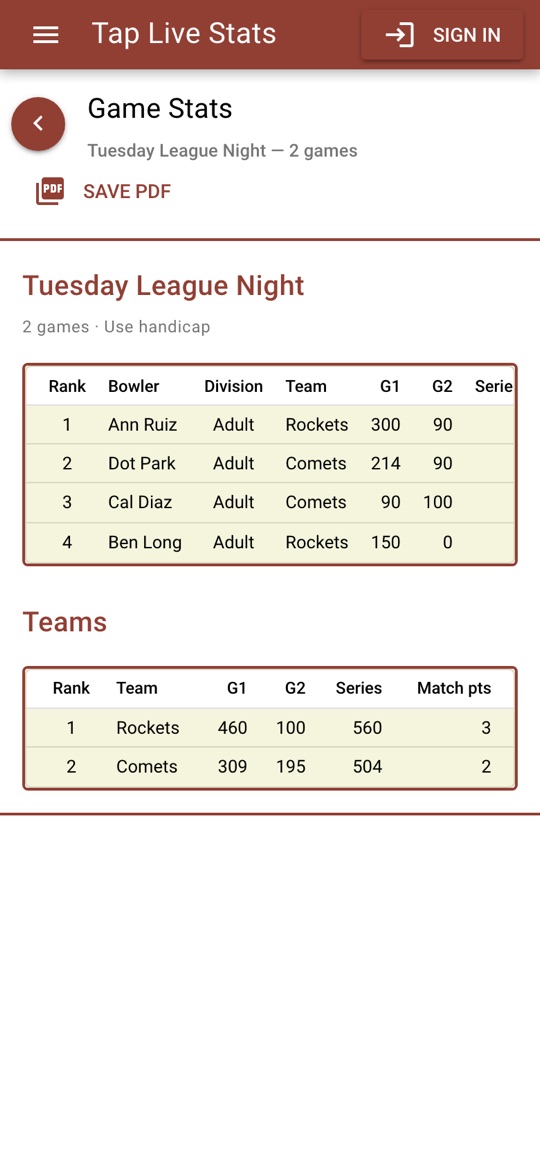
Open View Stats on the match for one row per bowler, ranked by series within their division:
- G1, G2 and so on: each game's score, without handicap.
- Series: the finished games added together. With handicap on, the column reads Series (HC) and includes the handicap for each finished game.
- Avg and High game: the average and best of the finished games, without handicap.
- Strike % and Spare %: strikes out of every ball thrown at a full rack, and spares out of every ball thrown at pins left standing.
Teams and match points
With teams, the Teams table adds each team's bowlers for every game, handicap included, and gives the series and match points. A game marked * is not finished yet. Match points go to the higher team score in each finished game and, once every game is finished, to the higher series; a tie splits the points.
Tips for accurate scores
- Add every bowler, with teams and handicaps, before the first ball.
- Use the next-bowler button to follow the lineup, and check the name at the top before each ball.
- Compare the scorecard with the lane monitor at the end of each frame; it is quicker to fix a ball straight away.
- Not sure what a screen does? Tap the ? at the top of the match screen for a short walkthrough.